AltoDocs Logo

Engineering documents
with embedded computation.

Write your report. Embed live calculations. Everything updates together.
No more screenshotting from Mathcad, Excel, and Bluebeam into Word.

Change an input. Everything recalculates. Your document stays formatted.

Web-based — Works on Mac, Windows, and any browser. No installation needed.

The engineering documentation problem

Sound familiar?

1
You write calculations in Mathcad.

Tables in Excel. Markups in Bluebeam. Reports in Word.

2
You screenshot everything into Word.

One by one. Dozens of images. Carefully aligned.

3
An input changes.

Now you redo it all. Re-run Mathcad. Re-export Excel. Re-screenshot. Re-paste. Hope you didn't miss any.

There has to be a better way.

One document. Everything live.

AltoDocs is a computational document editor — your report is the calculation. Embed live math, spreadsheets, drawings, and structural analysis directly in your document. No screenshots. No copy-paste. No separate files.

Click to enlarge

Embedded computation

Calculations live inside your document, not in a separate app

Auto-updating

Change one input — everything recalculates and reformats

Single source of truth

Your report, your calcs, your drawings — one file, always in sync

What you get with AltoDocs

Six powerful tools. One document. No screenshots.

MathCanvas

MathCanvas

Live calculations with unit-aware formulas — embedded in your document.

Replaces: Mathcad

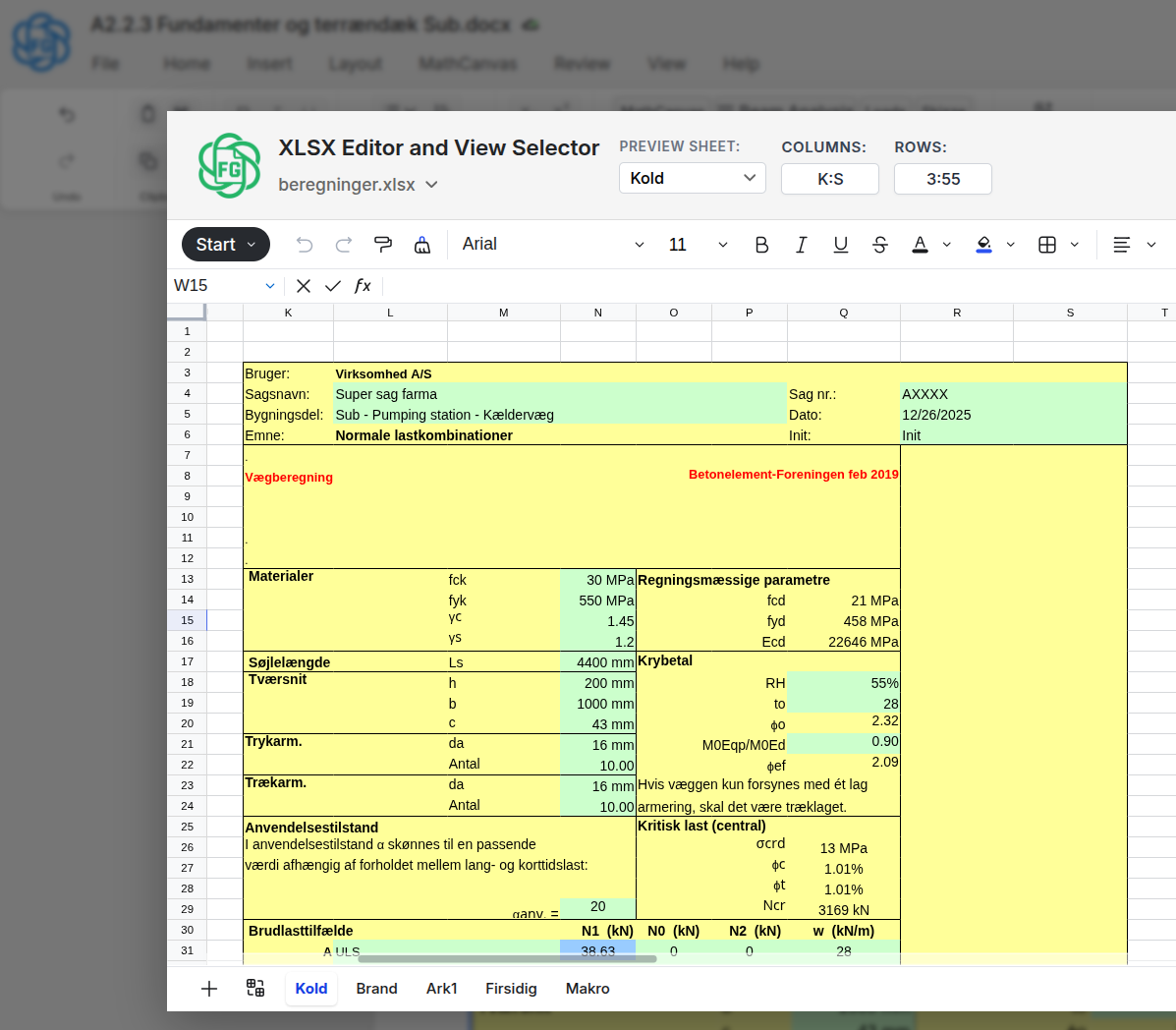
AltoSheets

AltoSheets

Excel-compatible spreadsheets embedded directly. Multiple views, always in sync.

Replaces: Excel screenshots

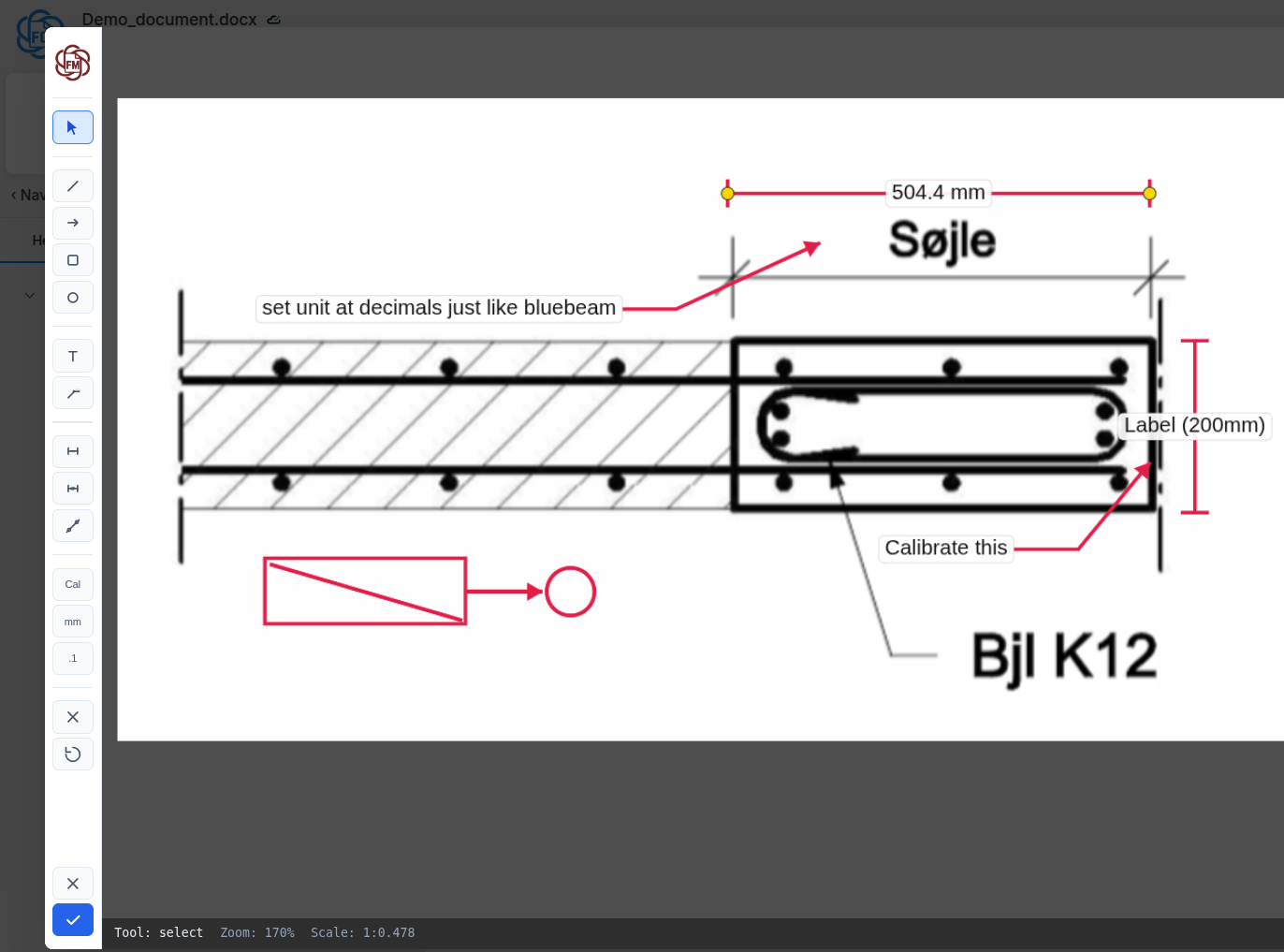
AltoMarkups

AltoMarkups

Annotate drawings with dimensions, callouts, and measurements — at the correct scale.

Replaces: Bluebeam screenshots

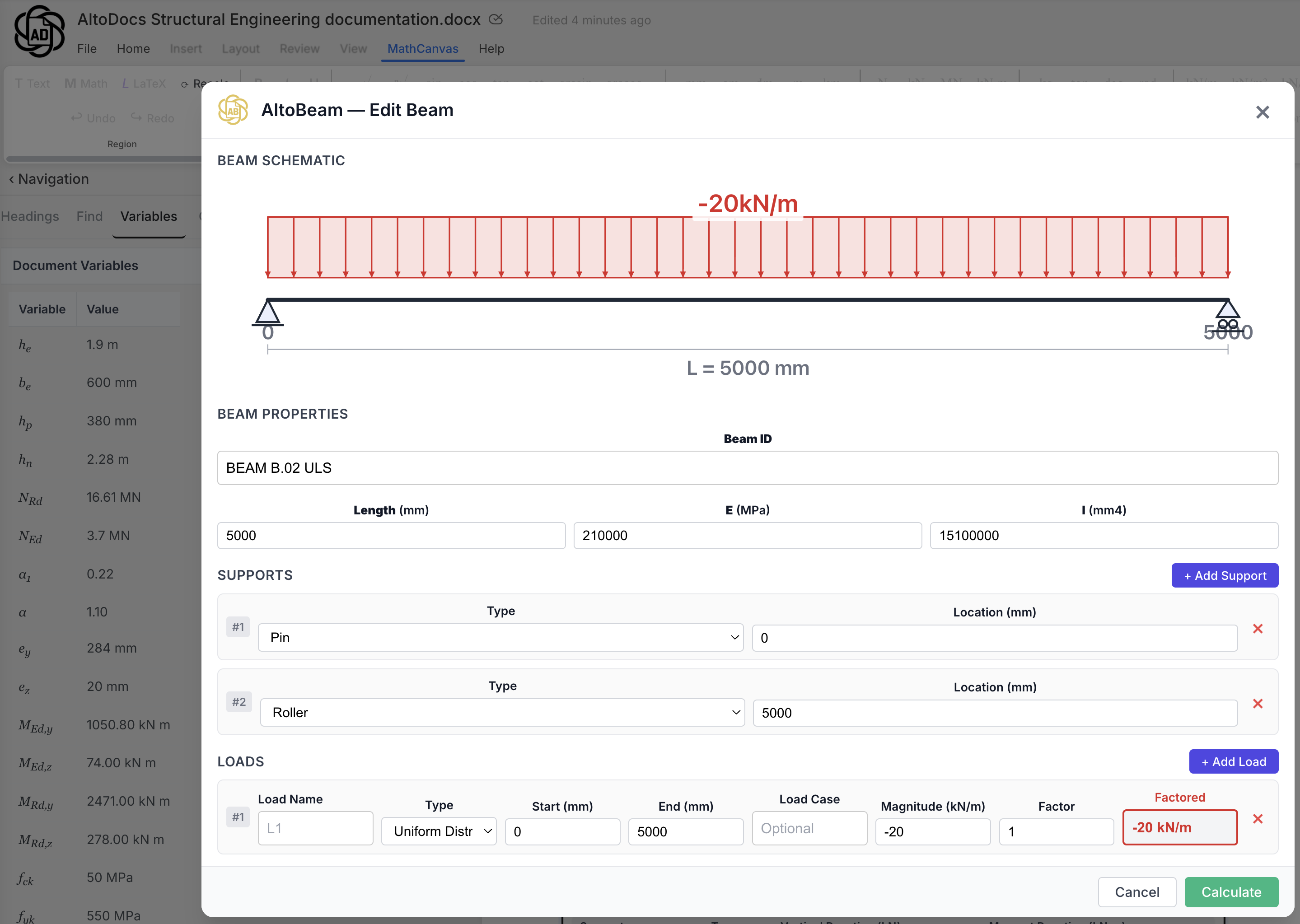
AltoBeamAltoFrame

AltoBeam & AltoFrame

Built-in structural analysis for beams and 2D frames. Results auto-update.

Replaces: Separate structural software

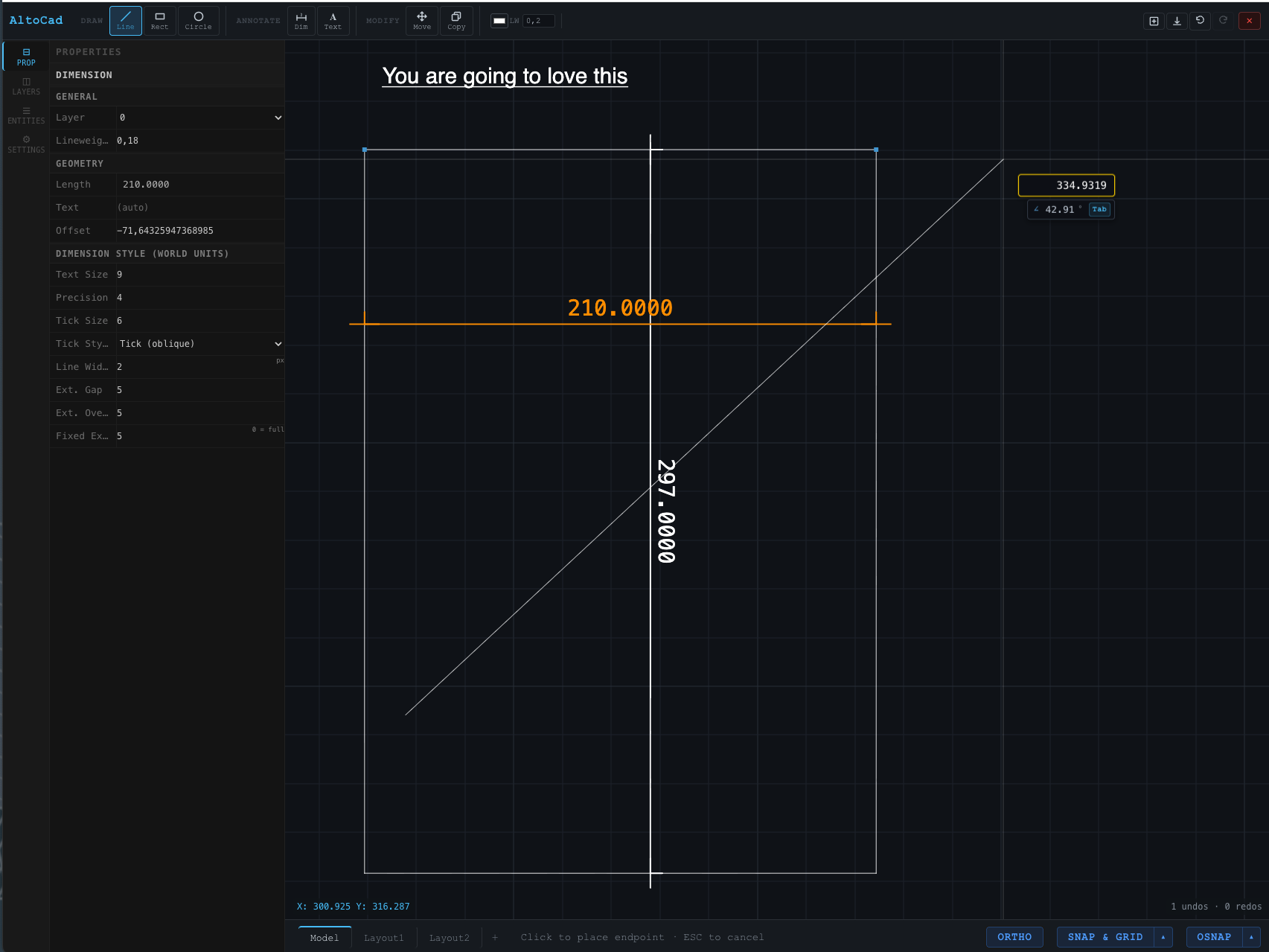
AltoCAD

2D CAD drawings inside your document. Draw, annotate, and dimension — without leaving your report.

Replaces: AutoCAD / separate DWG files

Python

Full Python in your browser. NumPy, SciPy, pandas, Matplotlib — no installation.

Replaces: External Python setup

The AltoDocs Advantage

Best Practice Blocks

Write a report once — with live calculations, drawings, and sheets living right inside it. Package the whole thing as one reusable block and drop it into any document.

Foundation Calculation.altodocs
MathCanvas
AltoSheets
AltoCAD
AltoBeam
AltoMarkups
One Best Practice BlockDrop into any document with one click
  • Any combination: Mix math, sheets, drawings, analysis — any tools you need
  • One-click insert: Drop entire workflows into any new document instantly
  • Import from Excel: Turn your proven spreadsheets into reusable blocks
  • Never redo work: Build your library once. Reuse it forever.

Built for engineers

Everything you need to write, calculate, and document — in one place.

MathCanvas

MathCanvas

Embed computations directly in your document

  • Unit-aware: Built-in units prevent errors
  • Top-to-bottom flow: Calculations run like hand calcs
  • Variable explorer: See all your variables at a glance
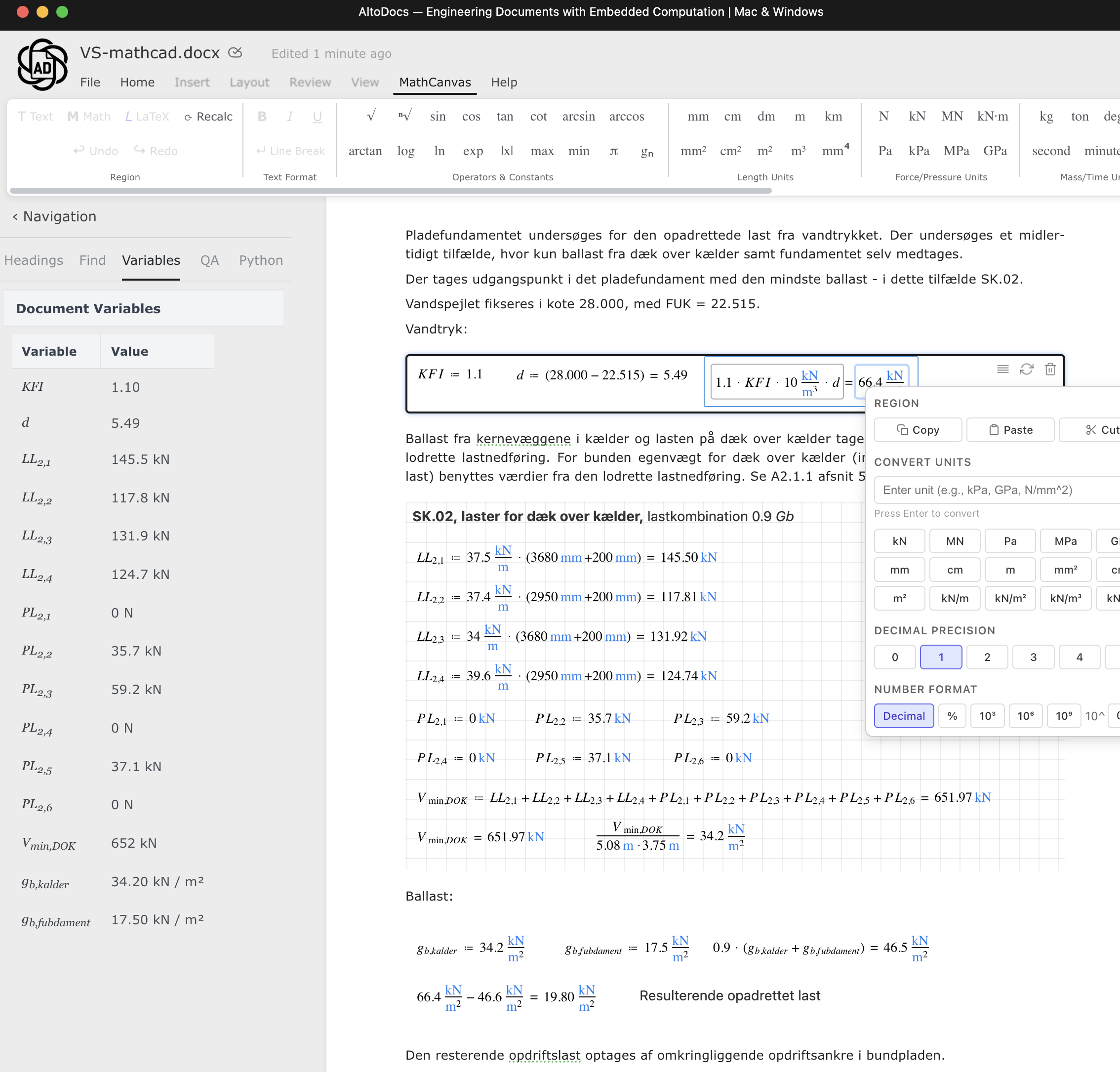
MathCanvas live calculations
AltoSheets

AltoSheets

Tables that calculate — no Excel needed

  • Live sync: No more copy-paste from Excel
  • Multiple views: Show different parts of your sheet
  • Full formulas: Excel-compatible calculations
AltoSheets editor
AltoMarkups

AltoMarkups

Annotate drawings without leaving your report

  • Scale-aware: Set scale for accurate measurements
  • Rich annotations: Arrows, shapes, text, dimensions
  • Auto-update: Changes sync across all viewports
AltoMarkups editor

AltoCAD

Full 2D CAD — lines, rectangles, circles, dimensions, text, and more

  • AutoCAD-style tools: Draw with the same snapping, grips, and precision you know
  • Dimensions & annotations: Dimension lines, leaders, and rich text labels
  • Layers & line types: Organize your drawing with full layer control
  • Viewports & layouts: Paper space with multiple named views per document
  • PDF export: Export your drawing to a print-ready PDF in one click
  • One document: Your drawing lives alongside your calculations — no separate DWG files
AltoCAD 2D drawing editor

AltoBeam & AltoFrame

Built-in structural tools for beam analysis, cross-sections, and more

  • AltoBeam: Shear, moment, and deflection diagrams
  • AltoFrame: 2D frame analysis with load cases
  • Linked: Connect results to your spreadsheets
AltoBeam editor

Best Practice Blocks

Your proven calculations, always ready to reuse

Build a personal library of proven calculations — drop them into any document with one click. Combine MathCanvas, AltoSheets, AltoMarkups, AltoBeam — any components — into powerful reusable blocks that make every document faster.

  • Import your Excel best practices: One-click import your proven spreadsheets
  • Any combination: Mix math, sheets, markups, analysis — all in one reusable block
  • One-click insert: Drop entire calculation workflows into any document
  • Never redo work: Build your library once, reuse forever

Python

Full Python in your browser — no installation needed

  • Full Python in the browser: NumPy, SciPy, SymPy, pandas, Matplotlib — all available
  • Jupyter-style cells: Write code, see results instantly
  • Plots and charts: Matplotlib figures render inline, right in your document
  • Zero configuration: No Python installation needed. Works on any device, any OS
Export to PDF — Print-ready engineering reports, generated from your live document.

Why not just use Mathcad?

Mathcad is math-first. AltoDocs is documentation-first with embedded computation. Your report is the calculation — not a separate file you screenshot into Word.

Mathcad + Word
AltoDocs
Approach
Math-first, separate from report
Documentation-first, embedded computation
Report workflow
Screenshot into Word
Calculations live in the document
When inputs change
Re-screenshot everything
Everything auto-updates
Spreadsheets
Separate Excel files
Embedded, always in sync
Drawing markups
Separate Bluebeam files
Annotate directly in document
2D CAD drawings
Separate AutoCAD / DWG files
Built-in AltoCAD — drawing inside your document
Structural analysis
Separate software
Built-in (AltoBeam, AltoFrame)
Platform
Windows only
Web-based — Mac, Windows, any browser
Collaboration
Email files back and forth
Real-time, like Google Docs
DOCX compatibility
Native
Import/export built in
Variable explorer
Not available
Navigate all variables — see values, units, jump to definition
AltoDocs
Engineering calculation document in AltoDocs with live embedded computation

Live calculations inside the document

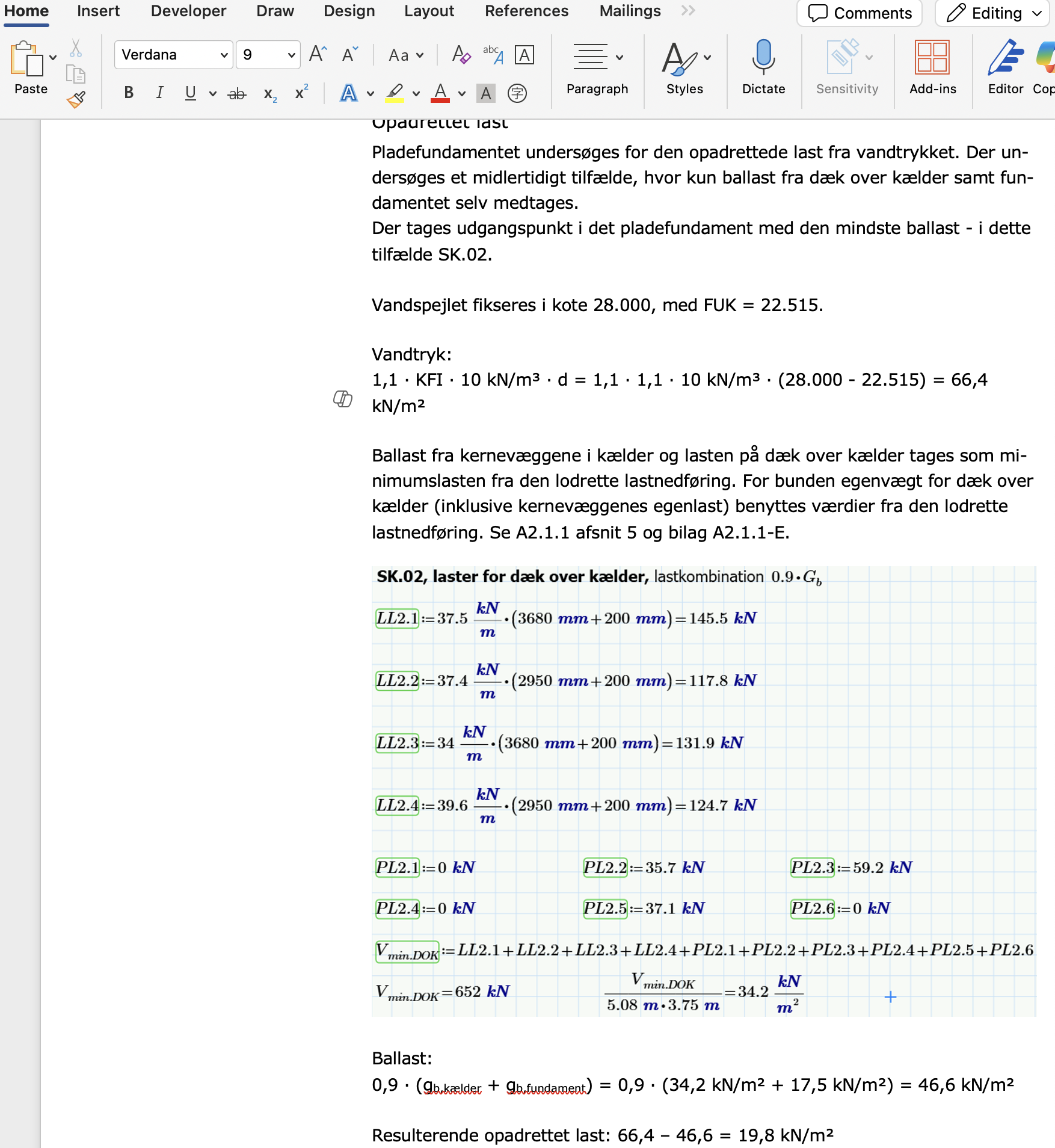
Word + Mathcad
Engineering calculation screenshots pasted into Microsoft Word from Mathcad

Static screenshots pasted into Word

Click to enlarge

Stop screenshotting. Start documenting.

See full AltoDocs vs Mathcad comparison →

Real-time collaboration

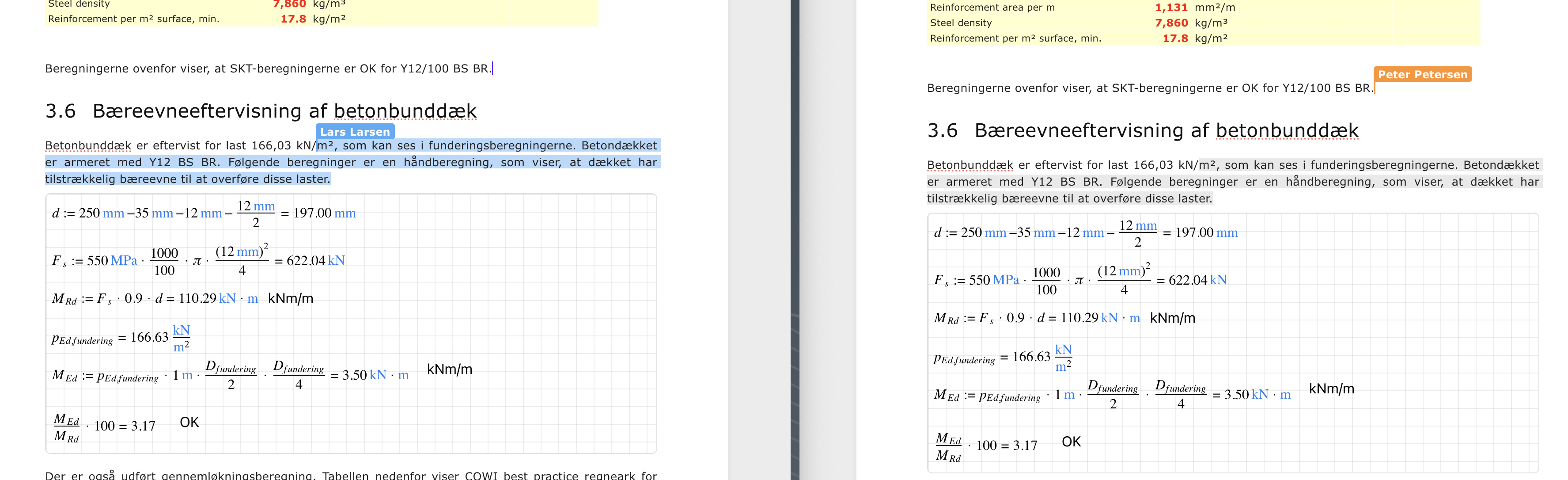
Like Google Docs for engineers. Multiple people can edit simultaneously. See live cursors. Watch changes appear instantly.

  • Live cursors: See where teammates are working
  • Instant sync: Changes appear immediately, no refresh needed
  • Zero conflicts: Automatic conflict resolution
  • Full history: Track every change, restore any version
Real-time collaboration in AltoDocs

Click to enlarge

Who uses AltoDocs?

Engineers who are tired of the screenshot-and-paste workflow.

Structural Engineers

Beam analysis, frame calculations, and load combinations — all documented in one report with live results.

Civil Engineers

Design documentation with embedded calculations for foundations, retaining walls, and infrastructure projects.

Mechanical Engineers

Design verification reports with live formulas, unit conversions, and annotated drawings — no separate tools needed.

Stop copy-pasting calculations into Word.

Start writing documents with embedded computation.

No installation. No credit card. Works in your browser.

Get in touch

Questions? Feedback? We'd love to hear from you.

Community

Connect with other engineers using AltoDocs.

LinkedIn →

Email

Support, feedback, or partnerships.

contact@altodocs.io

Try it

The best way to see if it works for you.